One connected platform for your business. Discover LaraOffice ERP →
Payroll Management

Payroll you can review, not just calculate.

Bring employee pay components, additions, deductions, loans and relevant HR inputs into a structured payroll workflow. LaraOffice Payroll is designed to support calculation, review and reporting, with finance hand-offs based on configured rules.

✓ Transparent pay components and reviewable payroll results.
Payroll run overview
Payroll workspace · Example layout
Monthly run⌄
Employees in run248Illustrative count
Run statusReviewApproval required
Pay componentTypeAmount
Basic salaryEarningsRs. 85,000
AllowanceEarningsRs. 12,000
Loan instalmentDeductionRs. 5,000
Statutory itemsDeductionConfigured
Illustrative net payRs. 92,000
Sample figures and components only — not a live payroll calculation.
+ Earnings & additions
− Deductions & loans
✓ Reviewable calculations
▤ Payroll reporting
See it in LaraOffice

Payroll processing by group and period

Run payroll for each payroll group and period, then review, freeze and finalise with full traceability.
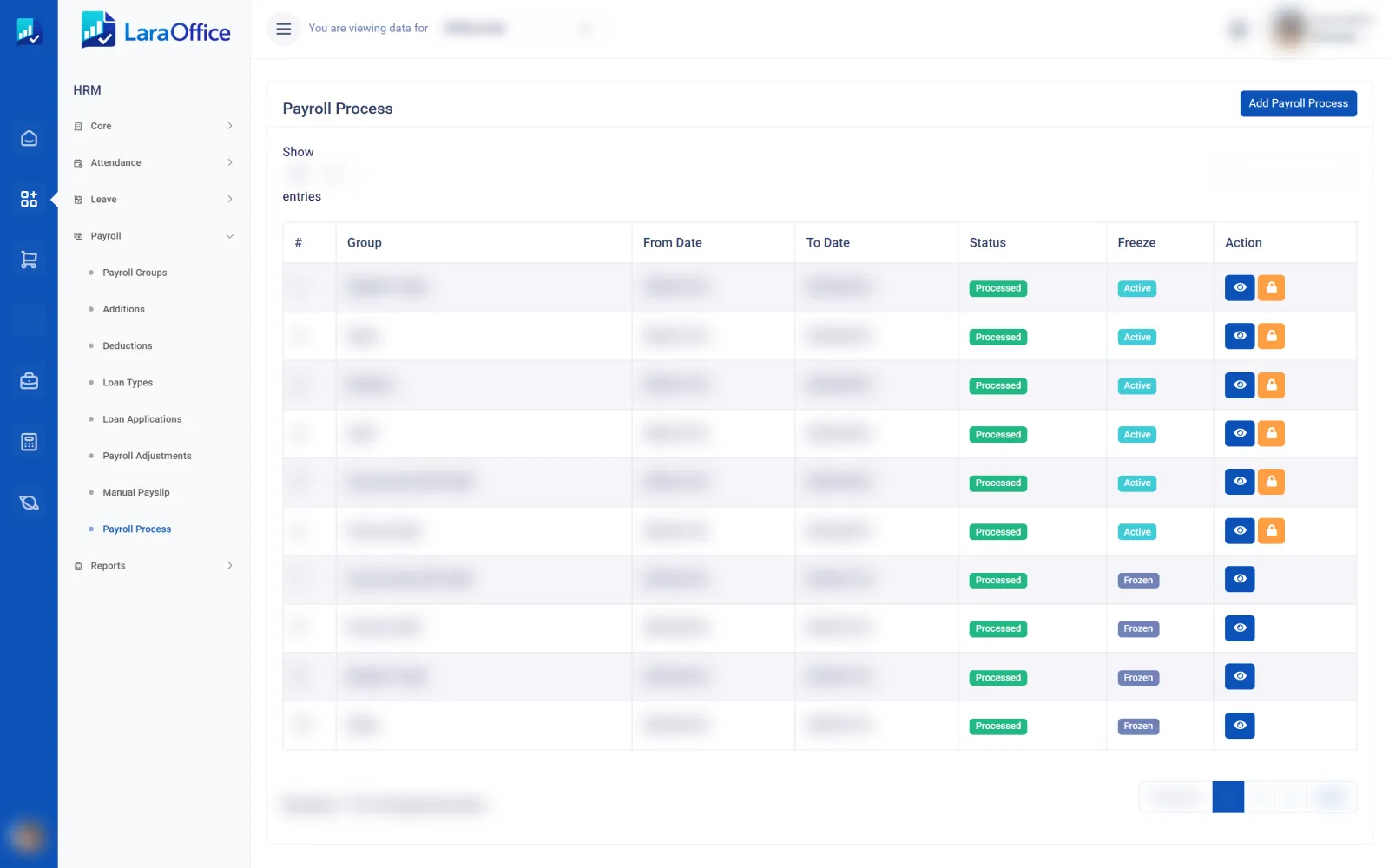
LaraOffice payroll process list by group and period
Real LaraOffice screen. Customer and employee data is blurred for privacy.
Payroll capabilities

Build a consistent payroll process

Structure pay rules and payroll inputs so calculations can be reviewed before they are finalised. The exact feature set and statutory configuration must be confirmed for your deployment and jurisdiction.

+

Addition & earnings masters

Define earning components and apply them to employees through configured payroll rules.

  • Salary additions and allowances
  • Recurring or one-off items where supported
  • Configurable calculation rules
−

Deductions & loan management

Organise deductions and loan-related payroll entries with traceable amounts and rules.

  • Deduction masters
  • Employee deduction assignments
  • Loan instalments and balances where enabled
▤

Employee pay setup

Maintain payroll-relevant employee assignments and pay components with a consistent structure.

  • Employee additions and deductions
  • Applicable pay components by employee
  • Effective dates and validation where configured
◷

Attendance & leave inputs

Use relevant HR inputs as part of payroll preparation where the connected modules are enabled.

  • Attendance and shift-related inputs
  • Leave records and payroll impact
  • Exception review before calculation
⚙

Payroll calculation & review

Calculate payroll using configured earning, deduction and employee rules, then review the results.

  • Gross-to-net calculation workflow
  • Exception and variance review
  • Approval steps where configured
▥

Payroll reports

Prepare payroll summaries and employee-level breakdowns for authorised review and follow-up.

  • Payroll register and summaries
  • Earnings and deductions breakdown
  • Finance hand-off reports where enabled
Payroll workflow

Define the rules before running the numbers.

Reliable payroll depends on consistent employee data, validated pay components and the right inputs for the payroll period. Keep the steps visible so exceptions can be resolved before final approval.

✓Configured components: maintain approved earnings, deductions, loans and applicable rules.
✓Validated inputs: review employee assignments, attendance and leave information where relevant.
✓Review before finalising: investigate unusual values and confirm approvals.
✓Traceable outputs: retain payroll summaries and pass configured totals to finance.
01 / CONFIGURE

Set up payroll masters

Define addition, deduction and loan rules according to the organisation’s approved policy.

02 / PREPARE

Collect employee inputs

Check pay assignments and relevant attendance, leave or other period-specific inputs.

03 / CALCULATE

Run payroll calculations

Calculate earnings, deductions and net pay using the configured payroll rules.

04 / REVIEW

Approve and report

Resolve exceptions, complete required approvals and prepare reports or finance hand-offs.

Governance & accuracy

Payroll needs control as well as speed

Payroll information is sensitive and calculations affect employees directly. Use clear permissions, documented rules and validation before results are approved.

Calculation and approval controls

Set up review points that match your payroll policy and the responsibilities of your HR and finance teams.

✓ Defined earning and deduction components
✓ Review of missing or unusual payroll inputs
✓ Approval steps for payroll runs where configured
✓ Restricted access to sensitive payroll information

Reconciliation and reporting

Use payroll summaries to help confirm totals before payment processing and accounting hand-off.

✓ Employee-level earnings and deductions
✓ Payroll register and period summary
✓ Comparison and exception review where available
✓ Finance posting and liability reconciliation where enabled
⚖

Statutory and tax rules must be validated

Payroll legislation, contribution rates, tax bands and reporting obligations vary by country and change over time. Confirm the applicable Sri Lankan or other jurisdiction-specific rules, effective dates and calculations with qualified advisers before using payroll outputs for compliance or filing.

Connected workforce operations

Payroll is linked to HR and finance

Connect employee data and approved payroll results to the relevant business processes using verified posting and reconciliation rules.

Human ResourcesEmployee records, pay assignments, leave and attendance inputs where enabled.
Finance & AccountingPayroll journals, liabilities and reconciliation workflows when configured.
Attendance & ShiftsPeriod attendance and shift-related inputs for applicable payroll calculations.
Reports & ManagementPayroll register, earnings breakdown and review summaries based on available data.
Frequently asked questions

Payroll FAQs

Important considerations for payroll configuration and day-to-day processing.

Payroll software organises employee pay components, additions, deductions and relevant inputs, calculates payroll results and provides reports for review and downstream processing.
LaraOffice’s payroll capability scope includes addition and deduction masters, employee-level assignments and configurable calculation rules. Confirm supported formula types and validation behaviour during implementation.
Relevant attendance, shift and leave inputs can form part of the intended workflow when the connected HR modules and calculation rules are enabled. Confirm exactly which inputs affect earnings or deductions.
No payroll system should be assumed compliant without validating its configured rules and effective dates. Confirm applicable statutory calculations, reports and legal requirements with qualified local advisers.
No. The dashboard figures and pay components shown on this page are illustrative examples only and are not connected to a live payroll calculation.

Build a payroll process your team can review.

Discuss employee pay components, calculation rules, attendance inputs, statutory requirements and finance integration with the LaraOffice team.