One connected platform for your business. Discover LaraOffice ERP →
Enterprise marketing

Connect marketing activity to business outcomes.

Manage campaign planning, budget and content approvals, consent-aware audience segments, lead capture, engagement, CRM handover and conversion tracking as part of connected enterprise operations.

✓ Campaign management✓ Connected workflows✓ Spend and conversion review
LARAOFFICE · MARKETING OVERVIEW
Preview
Campaign workspaceIllustrative data
08Sample data
32Illustrative
05Next actions
Retail PromotionIN PROGRESS
Budget and content approval · Audience validation
Product LaunchREADY TO REVIEW
Consent-aware segment · Engagement tracking
Customer ActivationPLANNING
Lead capture · CRM assignment
Roadmap status: Marketing is a enterprise LaraOffice ERP module. The capabilities shown here are proposed concepts, not a promise that the module or integrations are currently available in production.
See it in LaraOffice

Promotions with budgets and rules

Plan promotions with rates, budgets, active days, branches and target items or categories.
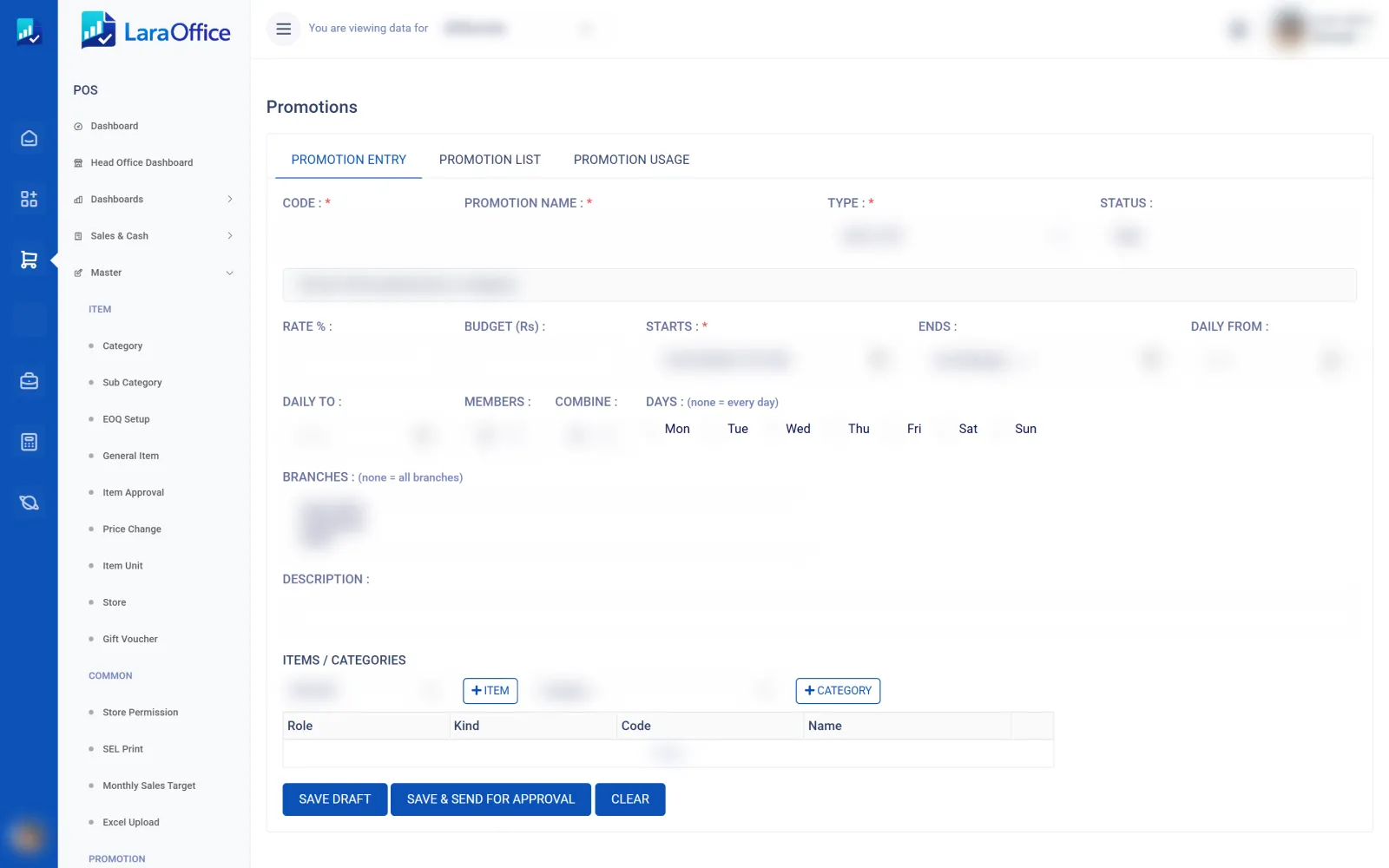
LaraOffice promotion entry screen
Real LaraOffice screen. Customer and employee data is blurred for privacy.
Enterprise capabilities

Manage the campaign lifecycle with control and traceability.

LaraOffice Marketing supports an enterprise workflow that connects campaign setup and approvals with audience eligibility, engagement, lead handling and business outcome reporting.

▦

Campaign planning

Define campaign objectives, budgets, channels, audiences, schedules and owners, with approval steps before execution.

◎

Audience and consent management

Build eligible audience segments using consent-aware rules, and respect suppression and unsubscribe preferences.

☷

Content, templates and localisation

Manage campaign content, reusable templates, localisation and required reviews as part of the controlled campaign workflow.

♧

Lead capture and assignment

Capture responses from campaign landing forms, reduce duplicate lead creation, and route leads to the appropriate CRM owner.

✓

Engagement and delivery tracking

Track configured provider delivery, bounce and engagement events, while ensuring suppression and unsubscribe status is respected.

⌁

Attribution, spend and conversion

Connect campaign source and attribution data with spend and conversion reporting using documented attribution windows and explicit measures.

Connected ERP workflow

Follow the path from audience engagement to revenue.

Marketing results become more useful when they connect to customer and financial records. LaraOffice’s enterprise workflow links campaign engagement to CRM lead handling, sales outcomes and finance reconciliation.

  • ✓Campaign governance: manage objectives, budgets, channels, schedules, ownership and approvals.
  • ✓Audience control: use consent-aware segments, landing forms and suppression rules.
  • ✓Lead lifecycle: capture leads, apply scoring and assignment rules, then hand leads to CRM.
  • ✓Engagement records: process configured delivery, bounce and engagement events from providers.
  • ✓Business outcomes: report campaign spend, attribution and conversions linked to sales and billing.
Discuss your marketing workflow ↗
▦

Campaign governance

Objectives, budgets, channels, schedules, owners and approval controls.

◎

Audience eligibility

Consent-aware segments, suppression rules and unsubscribe handling.

▤

Content and templates

Reusable content, localisation and review steps for campaign execution.

↗

Lead lifecycle

Landing-form capture, source attribution, scoring and CRM assignment.

◷

Provider engagement

Configured delivery, bounce and engagement events, with retry safety.

$

Spend and conversion

Campaign costs and conversion results connected to sales and finance records.

Enterprise process

One controlled flow across connected modules.

Marketing is not isolated from the rest of the ERP. Its outcomes should be traceable into CRM, Sales, Billing and Finance, with controls and reconciliation at each handover.

01

Plan and approve

Set the objective, budget, channel, audience, schedule and owner; obtain required approvals.

02

Validate audience

Check consent, segments, suppression and unsubscribe rules before provider delivery.

03

Capture and qualify

Record engagement, capture leads once, score them where configured and assign them to CRM.

04

Reconcile outcomes

Connect qualified leads to sales orders and invoices, then report conversions and campaign spend.

Connected flow: Campaign → consented audience → delivery and engagement → CRM lead and assignment → qualified opportunity → Sales order → Billing invoice → Finance revenue/spend reconciliation.
Frequently asked questions

Enterprise Marketing FAQs

LaraOffice Marketing is an enterprise ERP function designed to connect campaign execution and engagement with CRM and commercial outcomes.

It manages campaign setup and approvals, budgets, channels, audiences, schedules, content and templates, consent-aware segments, lead capture, engagement events, lead scoring and assignment, campaign spend and conversion reporting.
Channel delivery depends on the providers configured for the deployment. Email, SMS, WhatsApp and social integrations should only be used when configured and lawful; they are not implied to be automatically connected by default.
Provider integrations are configuration-dependent. The marketing workflow can process delivery, bounce and engagement events when the relevant provider is integrated; channel connections should be confirmed for each deployment.
The dashboard numbers and visual cards are illustrative sample data. The functional scope is enterprise campaign management, consent-aware lead generation and attribution connected to CRM, Sales, Billing and Finance. Contact LaraOffice for the latest roadmap status.

Connect marketing performance with enterprise business outcomes.

Discuss campaign governance, lead handover, attribution rules and spend reconciliation for your organisation.

Request a discussion ↗